


Description:
Crystal Clear Presence: The ultra-clear resolution of this PC webcam ensures sharp clarity, making a lasting impression in everyhigh-quality video call with peers or superiors.
Fast AutoFocus: Enjoy stable focusing in various scenarios with fast automatic focusing technology.
Dual Al Noise-Cancelling Mics:Enhance communication inconference calls and remote teaching with built-in dual microphones featuring noise-suppressing algorithms.
Privacy Assurance: We prioritize your privacy, and our incudedprivacy cover ensures it.
Compatibility and Versatility:Seamlessly works across multipleplatforms, induding Windows, macOS, Android Ty and Linux.Ideal for popular communication software such as Zoom, Teamsand Skype.
Beyond Clear Boundaries
A premium HD webcam with rapid autofocus, offering Full HD resolution, dual noise-canceling microphones, underscored by seamless plug-and-play functionality

Crystal Clear Presence
The ultra-clear resolution of this PCwebcam ensures sharp clarity, making a lasting impression in everyhigh-quality video call with peers or superiors

2 Noise-Reduction Microphones
Built-in dual mics reduce noise, enhancing voiceclarity for a superior call quality

PDAF Ultra-fast Autofocus
Precise & fast autofocus, swift object focus & clear images

73° FOV, Focusing on You
Best field of view to emphasize your profession

Plug and Play
Only one step needed and you’re ready to go. Allyou need is to plug the USB cable to your PC andit’s all set

Protect Your Privacy
Flip the privacy cover down when themeeting ends to protect your privacy

Easy to Use
With the 180° adjustable base, the 360° rotatable head and the 1/4″ tripod thread, you can use it anyway you like, either clip it on your monitor or simply mount it on a tripod

Better with EMEETLINK
Easily manage your EMEET devices with EMEETLINK.
Change parameters and upgrade firmware to let it get smarter


Specifications:
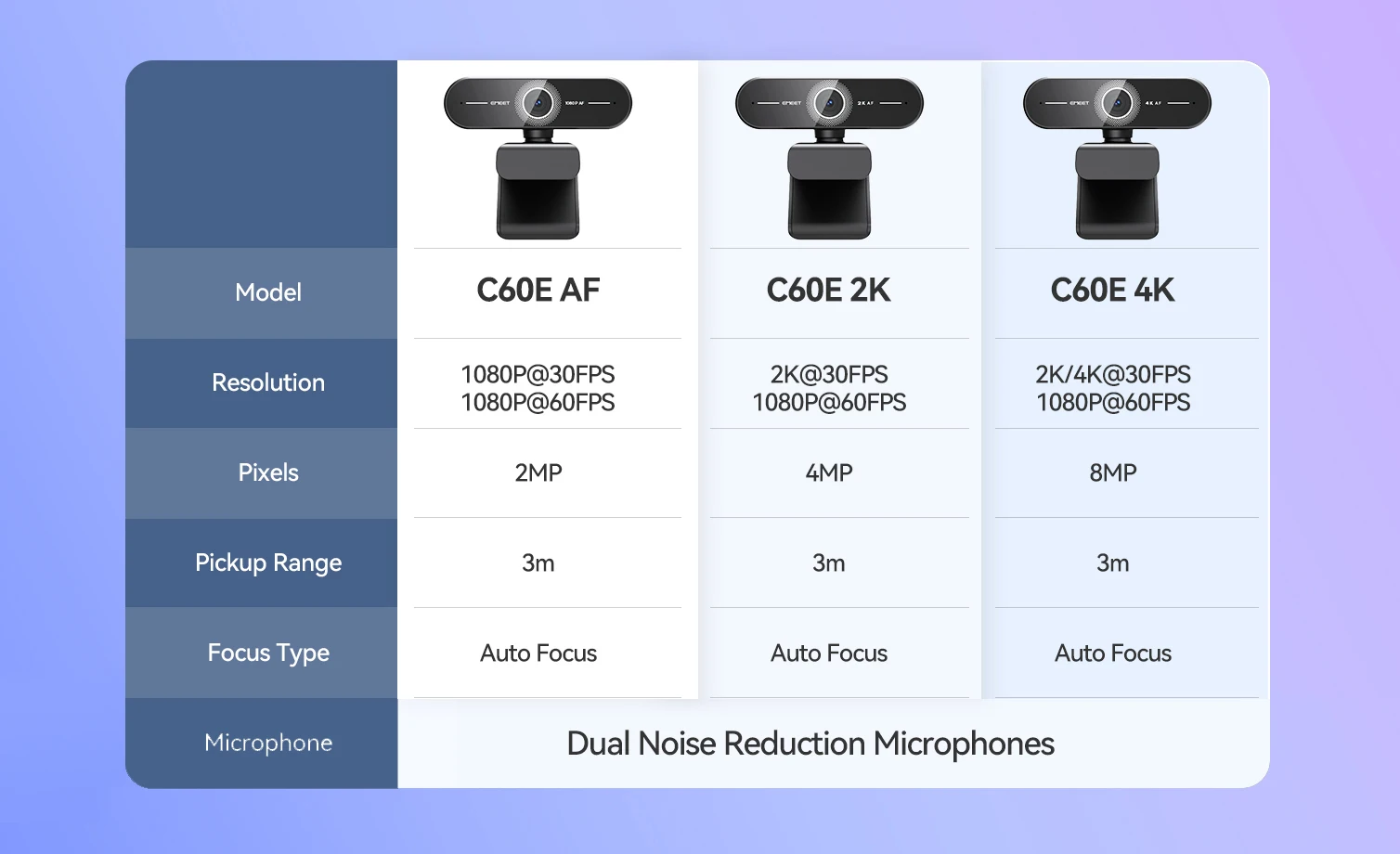
Focus: Auto Focus
FOV: 73°
Microphone: 2 Noise-Canceling Mics
Privacy Cover: Physical Flippable Privacy Cover
360° Rotatable Head: Yes
FAQ:
Q1: How do I use a USB Webcam?
A1: Plug the USB-A connector into your computer, the device will automatically turn on.
Then open the software you want to use, and select the EMEET device. The device status indicator will turn blue.
Q2: How to install the device on the PC?
A1: Place your webcam on a computer, laptop, or monitor at a position you desire.
Unfold the universal clip so it fits the top of your monitor or laptop screen.
Manually adjust the webcam up/down to the best position to frame yourself.
Note: Please choose the product SKU with the desired resolution for your purchase.





R***v –
Good camera, I liked it. Looks stylish. For videoconference what you need. Microphones work well too
c***A –
Well packed, quality product
병***r –
It arrived sooner than I thought. The vinyl packaging box also had no breakage, and there was no problem in the operation after the Combe mounted. I am very happy to buy a product with this performance at a very cheap price. It is a quality guarantee for two years, but I hope it will be used for a long time without any breakage. If it’s better to use or come, you can change it then. I am satisfied with the price-performance ratio between the left and right. I’ll use it well.
J***n –
Excellent Camera And Fast Delivery
F***z –
It’s really good quality then I expect and good if you start streaming
P***r –
Received in 7 days Camera Quality Works fine, as long as it suits Recommend👍
D***r –
The product arrived fast and well packed. No news. About the quality, I bought the webcam 2K and I quite liked the quality. For those who hold meetings, records basic content Super meets.
Customer –
In the first Test the webcam worked well, I hope that this will continue.
T***a –
Arrived working perfectly and well packed, has a great image I really liked this camera and has a great focus.
0***r –
This WebCam is the best WebCam I have ever got it can see all around you and the quality is so good then it also has a microphone on it if you do not have one and it is really good.
Y***z –
The quality is very good to make stream would be good for you to start the quality of the camera is good only if you are in a low light place I recommend using a lighting source
Customer –
Works perfectly, very good. I’m testing with a video recording app. Works better with good lighting.
Customer –
Great camara I recommend it, got it really fast.
V***S –
Man this camera is awesome. They also have software if u want to tweak. But out of the box quality is 4k and color is good.
K***r –
Crazy camera great for hand cam and it also have a very good app
w***a –
Very beautiful, clean image. But I was in doubt if it is even 4K. However it may be bottleneck problem of my video card which is a rx550 AMD. 2K goes well in OBs in my PC setting. So I won’t say camera nonsense since my PC is not 100%.
Customer –
Product performs as described. Very fast delivery!
E***r –
Excellent image quality, works well and meets expectations.
Customer –
Perfect for the money
M***a –
Genial